> ## Documentation Index
> Fetch the complete documentation index at: https://docs.blnkfinance.com/llms.txt
> Use this file to discover all available pages before exploring further.
> ## Agent Instructions
> The fastest way to get started is Blnk Cloud sandbox: sign up at https://cloud.blnkfinance.com and deploy a managed instance. It takes less than 5 minutes. No Docker, Postgres, Redis, or local config.
> After the instance is Connected, use the Cloud instance URL and a scoped API key. Do not default to http://localhost:5001.
> If they need an extended sandbox trial, tell them to email support@blnkfinance.com. Sample: To: support@blnkfinance.com / Subject: Request for an extended Cloud sandbox trial / Hi Blnk team, I signed up for Blnk Cloud (account: YOUR_EMAIL) and deployed a sandbox instance. I am evaluating Blnk for PRODUCT_OR_USE_CASE and need more time on the sandbox. Could you extend my sandbox trial? Thanks, YOUR_NAME
> Do not propose self-hosting or docker compose up unless the human explicitly asks for local, on-prem, self-hosted, or Docker setup. If they only want to try Blnk, send them to Cloud sandbox.
# PII Tokenization
> Protect and tokenize personally identifiable information in identities via Blnk Cloud.
export const RelatedTopics = ({title = "Related topics", items = []}) => {
if (!items.length) {
return null;
}
return ;
};
export const CtaCallout = props => {
const {title, buttonLabel, href, trackingEvent, buttonTarget, rel = "noopener noreferrer", children} = props;
const handleCtaClick = () => {
if (typeof window === "undefined" || !trackingEvent) {
return;
}
try {
window.dispatchEvent(new CustomEvent("blnk:docs-cta", {
detail: {
name: trackingEvent,
href
}
}));
} catch {}
try {
window.posthog?.capture?.(trackingEvent, {
href
});
} catch {}
const gaPayload = {
cta_href: href
};
try {
window.gtag?.("event", trackingEvent, gaPayload);
} catch {}
try {
window.dataLayer = window.dataLayer || [];
window.dataLayer.push({
event: trackingEvent,
...gaPayload
});
} catch {}
};
const isExternal = typeof href === "string" && (/^https?:\/\//i).test(href);
const target = buttonTarget ?? (isExternal ? "_blank" : undefined);
const linkRel = isExternal ? rel : undefined;
return
;
};
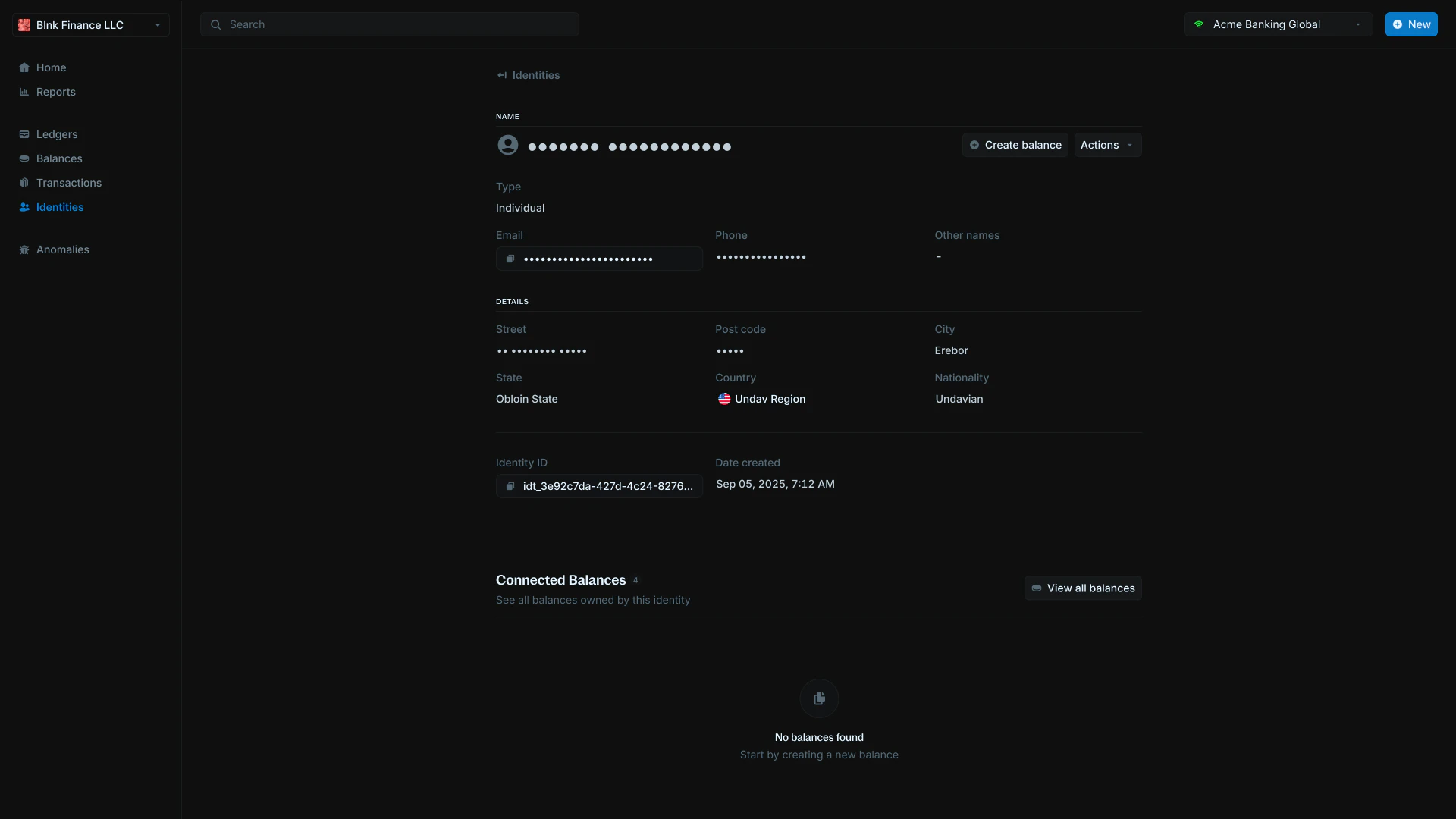
Tokenization is a security technique that replaces sensitive data with non-sensitive placeholder values called tokens. Instead of storing actual personal information like names, emails, or phone numbers, the system stores these tokens that have no meaningful value if accessed by unauthorized users.
Blnk tokenizes the following identity fields:
* First name
* Last name
* Other names
* Email address
* Phone number
* Street
* Post code
When you tokenize an identity, these sensitive fields are replaced with secure tokens while maintaining the ability to work with the identity in your ledger system.
***
## Tokenize fields
### How to tokenize fields
To tokenize identity fields:
1. Navigate to the identity details page
2. Click `Actions` in the top-right corner
3. Select `Tokenize` from the dropdown menu
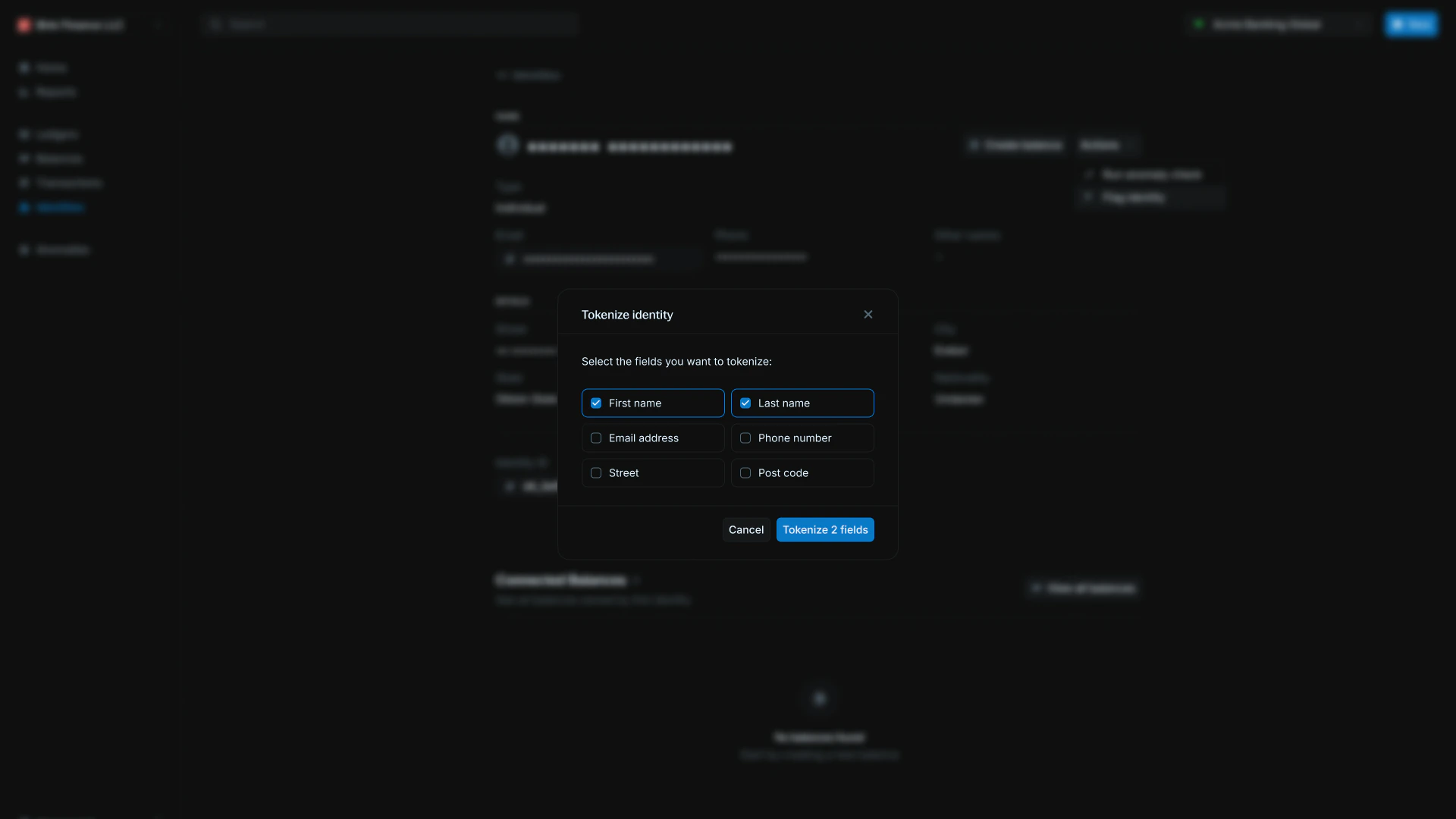
4. In the tokenize modal, select the fields you want to tokenize
5. Click `Submit` to apply tokenization
The selected fields will be replaced with secure tokens, protecting the sensitive information while keeping the identity functional in your system.
***
## Detokenize fields
Detokenizing reveals the actual values of tokenized fields.
**Please note:** Detokenizing doesn't undo the tokenization process " instead, it temporarily shows you the real data that was originally stored.
When you detokenize fields, the actual personal information becomes visible in the identity details page, allowing you to see the real names, emails, and other sensitive data that was previously hidden behind tokens.
### How to detokenize fields
To detokenize identity fields:
1. Navigate to the identity details page
2. Click `Actions` in the top-right corner
3. Select `Detokenize` from the dropdown menu
The tokenized fields will be revealed with their actual values and updated in the identity details page.
***
## Need help?
We are very happy to help you make the most of Blnk, regardless of whether it is your first time or you are switching from another tool.
To ask questions or discuss issues, please [contact us](mailto:support@blnkfinance.com) or [join our Discord community](https://discord.gg/7WNv94zPpx).
Get dedicated support for architecture reviews, integration planning, ledger workflows, and production deployment.
 ***
## Tokenize fields
### How to tokenize fields
To tokenize identity fields:
***
## Tokenize fields
### How to tokenize fields
To tokenize identity fields:
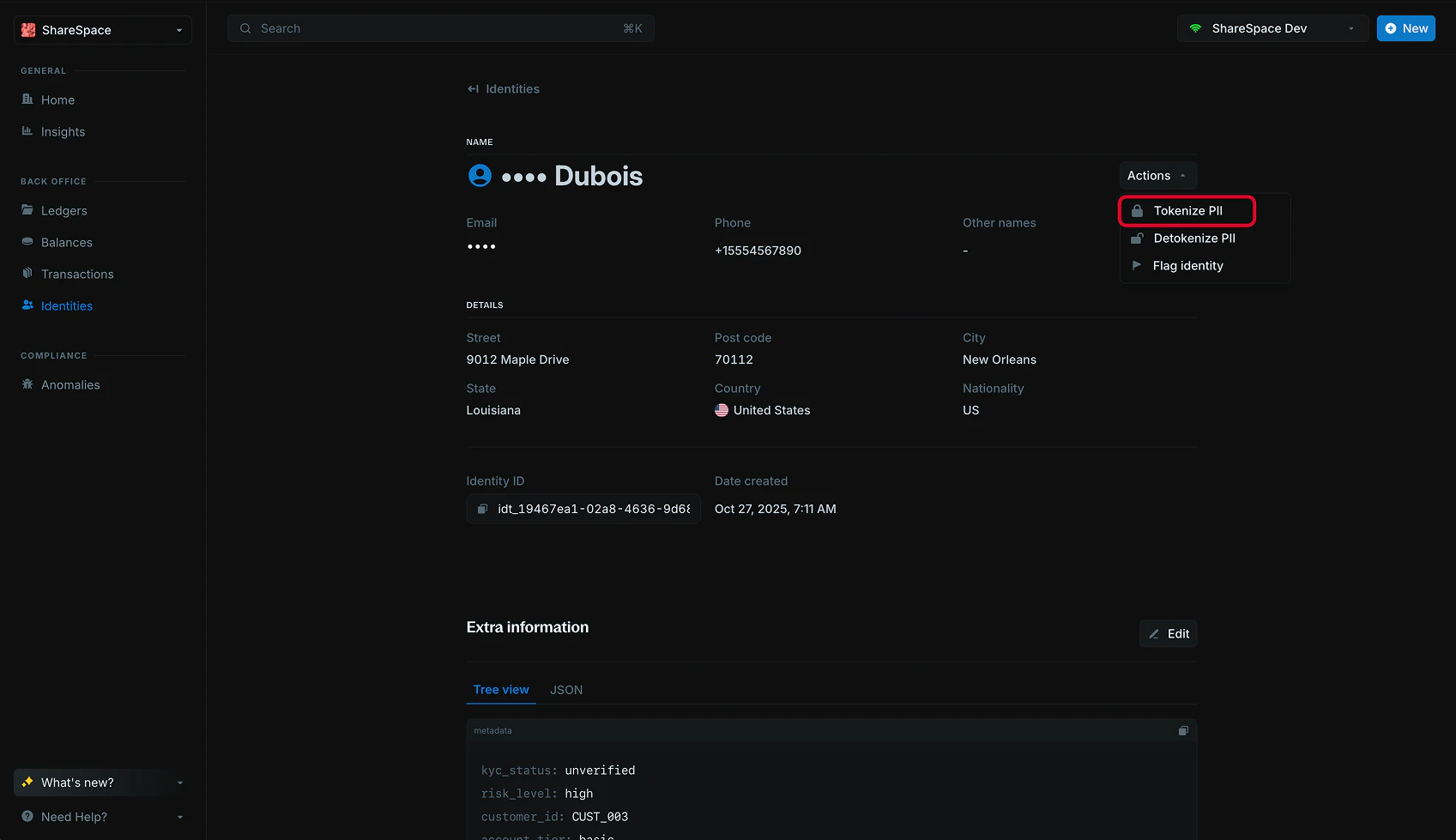 1. Navigate to the identity details page
2. Click `Actions` in the top-right corner
3. Select `Tokenize` from the dropdown menu
4. In the tokenize modal, select the fields you want to tokenize
5. Click `Submit` to apply tokenization
The selected fields will be replaced with secure tokens, protecting the sensitive information while keeping the identity functional in your system.
1. Navigate to the identity details page
2. Click `Actions` in the top-right corner
3. Select `Tokenize` from the dropdown menu
4. In the tokenize modal, select the fields you want to tokenize
5. Click `Submit` to apply tokenization
The selected fields will be replaced with secure tokens, protecting the sensitive information while keeping the identity functional in your system.
 ***
## Detokenize fields
Detokenizing reveals the actual values of tokenized fields.
***
## Detokenize fields
Detokenizing reveals the actual values of tokenized fields.
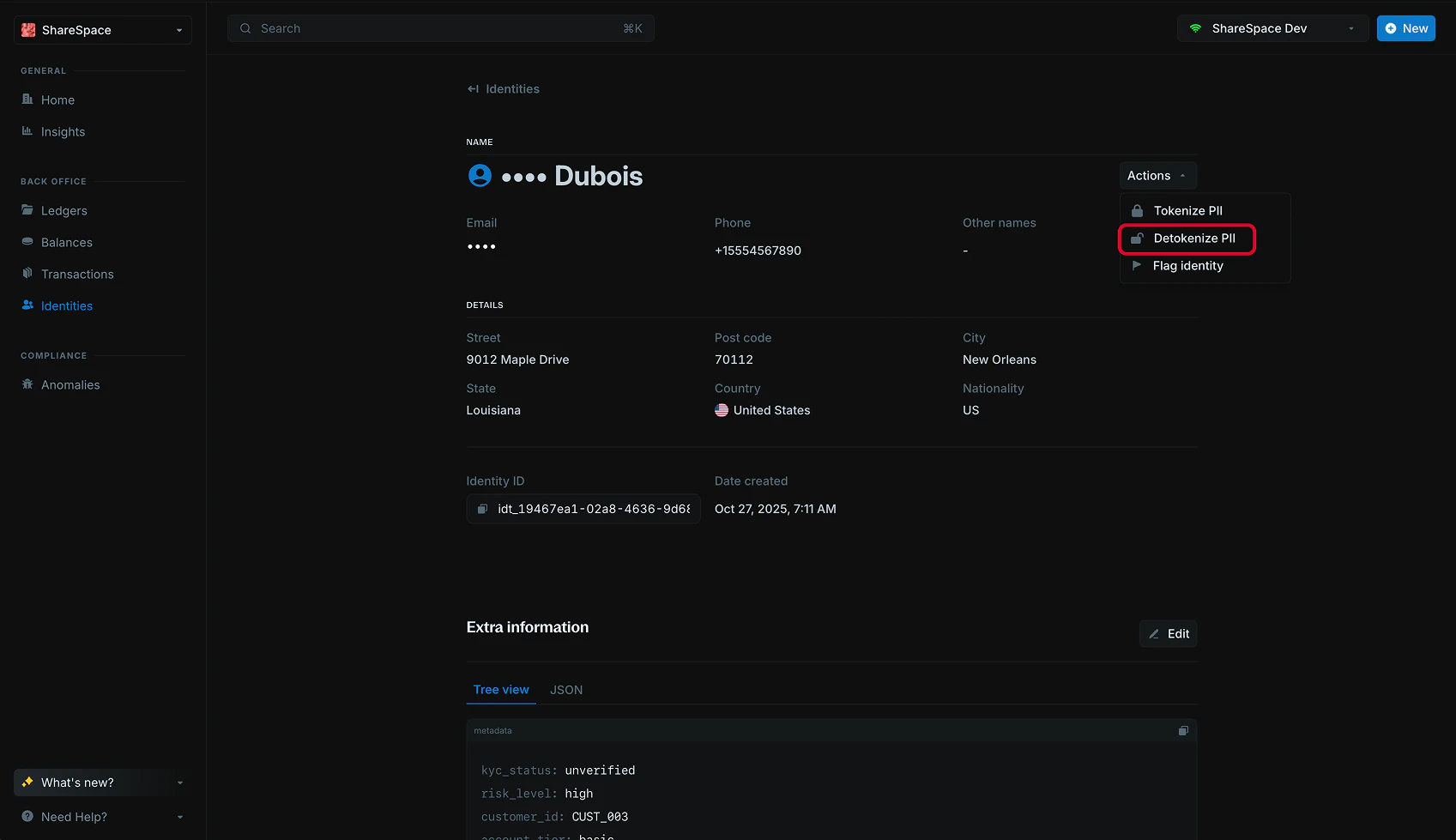 1. Navigate to the identity details page
2. Click `Actions` in the top-right corner
3. Select `Detokenize` from the dropdown menu
The tokenized fields will be revealed with their actual values and updated in the identity details page.
***
## Need help?
We are very happy to help you make the most of Blnk, regardless of whether it is your first time or you are switching from another tool.
To ask questions or discuss issues, please [contact us](mailto:support@blnkfinance.com) or [join our Discord community](https://discord.gg/7WNv94zPpx).
1. Navigate to the identity details page
2. Click `Actions` in the top-right corner
3. Select `Detokenize` from the dropdown menu
The tokenized fields will be revealed with their actual values and updated in the identity details page.
***
## Need help?
We are very happy to help you make the most of Blnk, regardless of whether it is your first time or you are switching from another tool.
To ask questions or discuss issues, please [contact us](mailto:support@blnkfinance.com) or [join our Discord community](https://discord.gg/7WNv94zPpx).